
LegacyAI Documentation
LegacyAI Documentation
LegacyAI is a ChatGPT client designed for Macintosh System 7 - 10.11 El Capitan. LegacyAI allows you to converse with OpenAI's ChatGPT from your Mac OS Desktop.
Table of Contents
Usage Tips
Key commands:
Command + N: New chat/clear the chat window
Command + O: Load a saved conversation
Command + S: Save your current conversation
Command + U: Check for updates
Commanad + P: Open the Preferences window
Command + M: Open the Conversations window
Other:
Click the "Manticore Software" text at the bottom the the application window to access a secret settings window!! This is intended for early feature testing in future versions.
There are several more Easter eggs hidden within the application!
68k User Notes
Due to compilation limitations, loading previous conversations in the 68k app build won't split the conversation history into individual messages. Instead, the full history is loaded as one message. This means that once the defined token limit is exceed the original loaded conversation will be removed/"forgotten" from the chat history since it's read as a single message, but all additional messages will be retained until the token limit is reached again. This issue does not affect PPC+ builds.
SSL Encryption
LegacyAI Classic and Universal Binary (OSX) builds now transfer and receive all message prompts over HTTPS. The Classic build uses TLS 1.0 (the latest version possible), while the Universal Binary supports TLS 1.2. The message transfer process is detailed below:
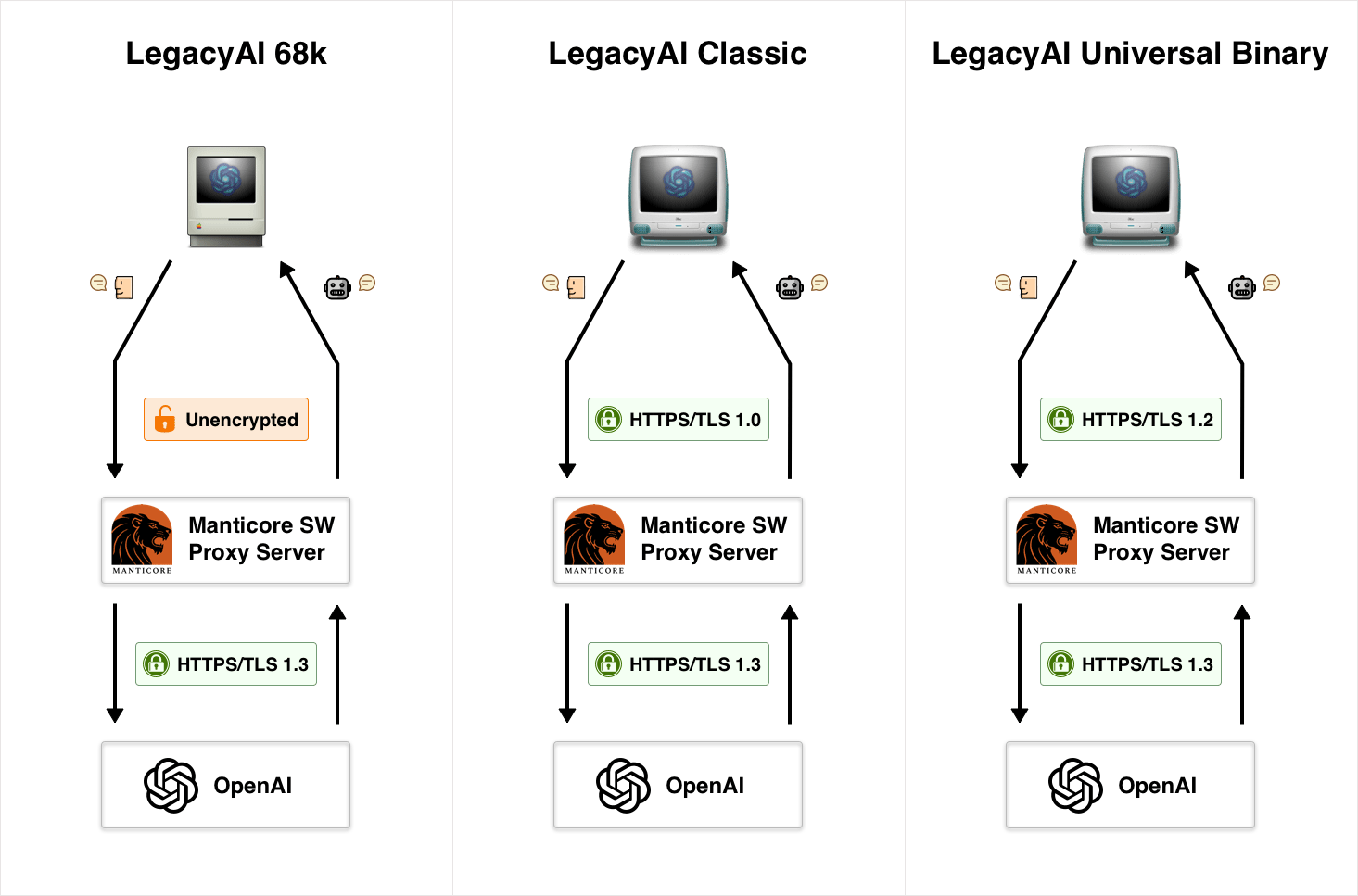
Proxy Server Configuration
LegacyAI can work with any AI service as long as you configure your proxy server to work within these constraints.
To configure LegacyAI to work with your proxy server, you need to open the Settings window. Then open the Proxy tab to see the configurable proxy server values.
Chat Endpoint:
Within this field, you need to enter the endpoint for receiving chat POSTs. LegacyAI will perform POST requests to this URL, where your server functions will then forward these to whichever AI service you plan to use. You then need to handle returning the response to LegacyAI.
Example endpoint: "http://myproxy.com/chat/"
Content payload sent by LegacyAI:
{
  "prompt": "ChatPrompt",
  "max_tokens": MaxTokens,
  "stop": [
    "User:    ",
    "AI:"
  ]
}
Headers sent with the POST request:
AI-Model: The AI model requested by LegacyAI - see below
App-Version: App metrics
App-Client: App metrics
API-Key: Available If you want to provide your AI service API key via the client
URL-Encoded: Indicates whether 68k response formatting is necessary
Tokens: Max token number for the AI service to return
Temperature: AI temperature tuning setting
LegacyAI does not send POST requests in the format that OpenAI expects by default. This is where the proxy server steps in and builds the request from what LegacyAI has sent it. To send a request with the form that OpenAI expects, see the Force OpenAI based POST requests below.
HTTPS Endpoint
If you want to enable HTTPS encryption with your proxy server you need to create an endpoint for HTTPS verification.
Example endpoint: "https://myproxy.com/https/"
LegacyAI will perform a GET request to your HTTPS endpoint, and expects a "true"/"false" response from your server telling it whether the request was made over HTTPS. You will need to implement the logic for this on your server.
Important Note: LegacyAI will only work via HTTPS if your server accepts TLS 1.0 for Mac OS 9 and under, and TLS 1.2 for OSX.
DALL-E Endpoint
Enter your server's DALL-E endpoint into this field. This is what LegacyAI will call when making image generation requests. Generation limits are removed if you're using your own server/API key.
API Key
Optionally suppy your API key to be sent with the request. This will be sent in the Authorization header when Force OpenAI based POST request is enabled.
AI Model
LegacyAI is hardcoded with AI models provided by OpenAI. If you use another service you can specify the requested AI model in this input. This will be sent in the headers when making a POST request.
Force standard POST
If you're running an AI service that is compatible with POST requests formatted for OpenAI, enabling this option will override LegacyAI's default request structure, and POST requests in the form that OpenAI would expect.
Example:
Headers:
Authorization: Bearer API_KEY
Content-Type: application/json
JSON Body:
{
  "model": "gpt-3.5-turbo",
  "messages": [
    { "role": "system", "content": "You are a helpful assistant." },
    { "role": "user", "content": "What's the weather like today?" }
  ],
  "temperature": 0.7,
  "top_p": 1,
  "n": 1,
  "stream": false,
  "stop": null
}